Reset Policy #
Inform the student that the reset policy applies only to the Mission plan for 1 year or more year.
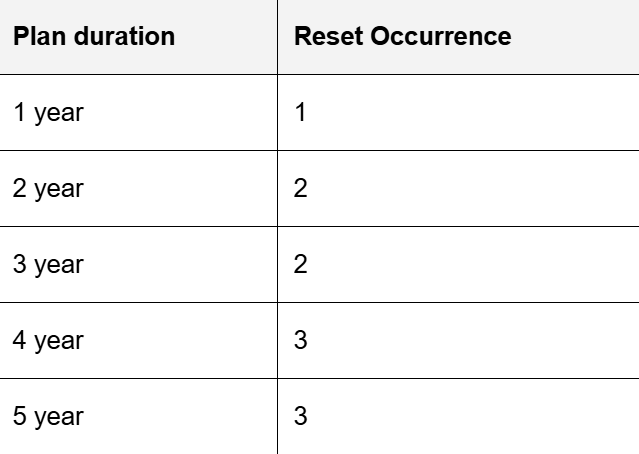
Reset Policy on extension #
Inform student we do not have reset option in extension plan
Reset policy on renew/new plan/upgrade #
All test will get reset in case student will renew/upgrade/purchase new plan
Ques : How can I reset the Q-bank and tests?
Ans : Tap the three horizontal lines in the top left corner of the app, go to Profile, then select Reset Data. You can choose to reset the Test, Q-bank, or both.
Ques : A student says their test did not reset after purchasing/renewing/upgrading their plan. What should be done?
Ans : Please record the issue in the Test Reset Sheet. The tech team will assist the student in resetting the test.
Ques : Will bookmarks be reset when a student purchases, renews, or upgrades their plan?
Ans : Yes, bookmarks will also be reset in case of a purchase, renewal, or upgrade.


